
Getting Started with Fastboot
Fastboot communicates with your device when the Android operating system is not running. It allows you to modify flash memory partitions, flash custom recoveries, install factory firmware, and unlock bootloader security.
01 What is Fastboot?
Unlike ADB which requires the Android Linux kernel and user space to be booted, Fastboot executes in the device Bootloader (Primary Bootloader / ABOOT) before any kernel is loaded into memory.
Runs inside Android OS. High-level commands (app install, logcat, shell, file sync, permission grants).
Runs at hardware firmware level. Low-level partition operations (erase, flash, unlock, format, unbrick).
02 Enter Fastboot / Bootloader Mode
There are two ways to enter bootloader mode: via ADB command (when Android is booted) or via hardware button combinations during power on.
adb reboot bootloader - Google Pixel: Hold Power + Volume Down until fastboot screen appears.
- Xiaomi / Poco: Hold Power + Volume Down until FASTBOOT mascot appears.
- OnePlus: Hold Power + Volume Up + Volume Down simultaneously.
- Motorola: Hold Power + Volume Down for 3 seconds, then release Power.
- Samsung: Modern Samsung devices use Download Mode (Vol Up + Vol Down while inserting USB cable).
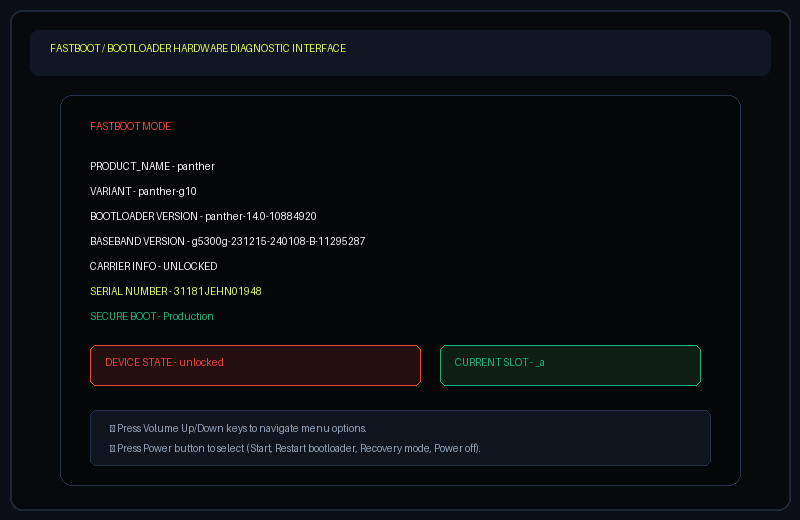
03 Check Device Detection (fastboot devices)
Connect your device via USB while on the fastboot screen and run:
fastboot devices -l If the output is completely blank, your computer lacks the low-level Android Bootloader interface driver. On Windows, update the device via Device Manager using the Google USB Driver (WinUSB).
04 Understand Android Partitions & A/B Slots
Android hardware storage is divided into isolated block partitions:
Contains the Linux kernel and ramdisk. Flashed when rooting with Magisk or KernelSU.
Verified Boot metadata hash tree. Ensures OS integrity; can be patched to disable verification.
The Android OS core framework, proprietary drivers, and pre-installed OEM system apps.
Your personal accounts, apps, photos, and encrypted databases in /data.
Modern devices have two duplicate slot sets: _a and _b. When an OTA is applied in background, it writes to the inactive slot. You can inspect your active slot with fastboot getvar current-slot and switch slots with fastboot set_active other.
05 Bootloader Unlocking & Locking Concepts
Executing fastboot flashing unlock triggers an immediate hardware crypto-wipe of the userdata partition. All accounts, photos, and files are permanently deleted. Back up critical files before proceeding!
fastboot flashing unlock fastboot getvar unlocked Looking for OEM-Specific Unlock Instructions (Xiaomi, Pixel, OnePlus, Motorola)?
Unlocking often requires brand-specific tokens, waiting periods (such as Xiaomi's 168-hour binding), or carrier permission. Refer to the complete step-by-step master handbook maintained by @mkr-infinity:
06 Flashing Basics & Live Booting
You can test a kernel or recovery image in RAM without writing to flash storage using fastboot boot <image.img>. If anything goes wrong, a simple power cycle restores your original state unharmed.
Flashing Generic System Images (GSI) on Android 10+?
Modern Android devices use dynamic partitions managed by fastbootd. Flashing a custom GSI requires wiping logical partitions, disabling dm-verity on vbmeta, and resizing system. Follow the official guide by @mkr-infinity: